


Did you know you can schedule posts on your blog/company’s Facebook page? It is so simple and there is no special software or anything you have to install.
Just go to your Facebook page and in the Status box where it says “What’s on your mind?” Start typing!

Click the clock on the bottom left (yeah I never noticed it before either)

Pick the Date/Time!
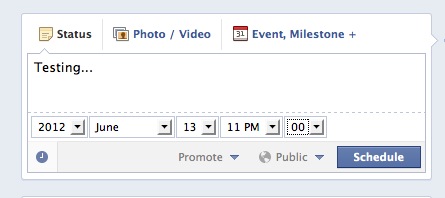
It is that simple!
Birdiebee says
I have tried this but I cannot schedule anything past today.
Kayla @ TheEclecticElement says
Wow. Just goes to show you how observant I am. LOL I never even noticed that little clock when updating statuses!
Thank you so much for the tid bit of information-It’s very much appreciated 🙂
Cher says
I think the clock is new because I never noticed it either! And it is also only for blog pages right now.
Lisa @ Oh Boy Oh Boy Oh Boy says
thanks. I knew you could but hadn’t looked into HOW
Crystal says
I just went to experiment with this and found I can do it from my blog’s fan page, but not on my personal FB.
Cher says
Yes sorry I forgot to mention it is only for bloggers fan pages